CANVID: Powerful Screen Studio alternative for Windows and Mac
- AI background removal keeps you looking sharp.
- Powerful AI Tools: Generative Webcam; Audio Retakes.
- Subscribe or buy once with lifetime access.

Key Differences Between CANVID and Screen Studio
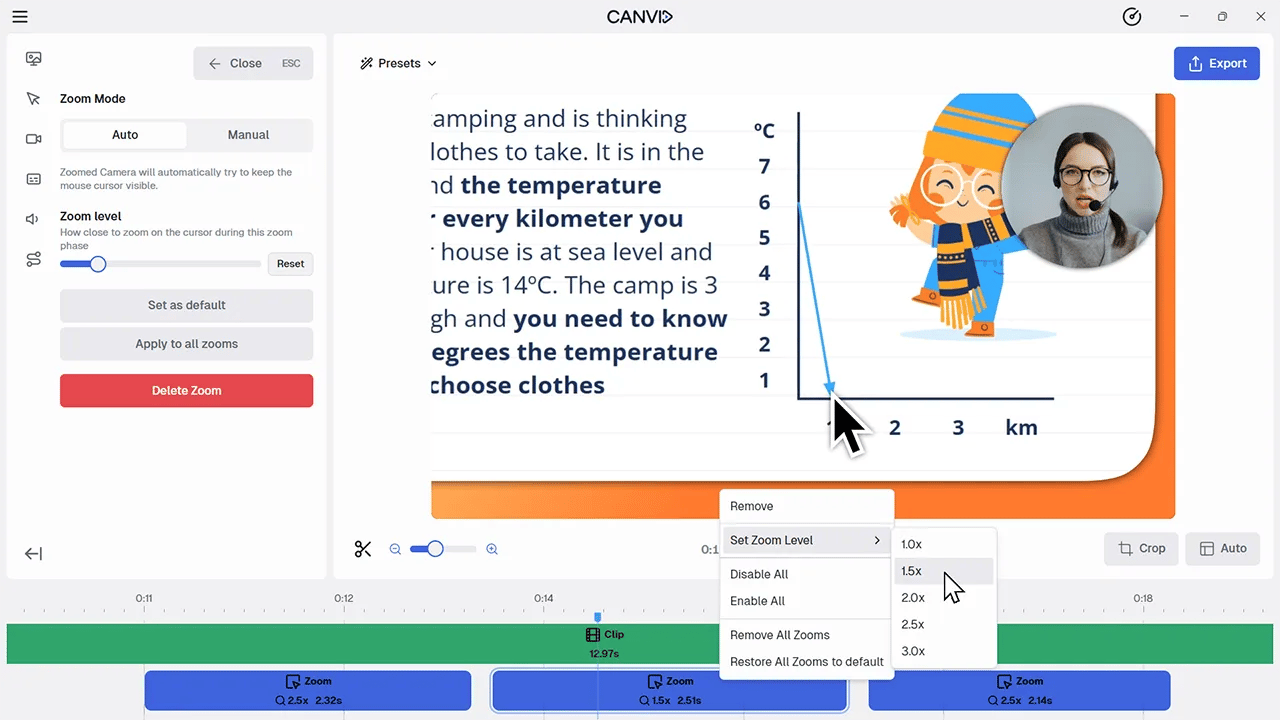
While both apps specialize in elegant auto-zooms and clean demos, their focus differs. Screen Studio is a macOS-only recorder with native iPhone/iPad capture and dynamic camera layouts. CANVID adds cross-platform support, transcript-driven editing, and AI retakes to fix voice/face after the fact.
Quick comparison of key features:
| Feature | CANVID | Screen Studio |
|---|---|---|
| Operating System | Windows & macOS | macOS only |
| Auto Zooms & cursor motion | Yes | Yes (core to product) |
| AI Video Editing | Yes (cut video from transcript) | Not available |
| AI Audio Retakes & Synthetic Webcam | Yes | Not available |
| Masking Sensitive Data | Coming soon | Yes |
| iPhone/iPad capture on Mac | Workarounds via mirroring | Native device capture on Mac |
| Licensing | Subscription or Lifetime | Subscription Only |
Webcam Customization and Visuals
CANVID lets you blur/remove/replace your background for a clean on-brand look; you can style the frame with rounded corners, shadows, and more. Screen Studio shines with Dynamic Camera Layouts to move/resize the camera elegantly over time.
📌 Verdict: Layout finesse (Screen Studio) vs. advanced AI background control (CANVID).
AI Editing & Workflow: Reduce Post-Production Time
While both tools excel at creating a polished recording on the first take, CANVID's focus on next-generation AI tools significantly reduces the need for manual post-production.
| Feature | CANVID | Screen Studio | Impact |
|---|---|---|---|
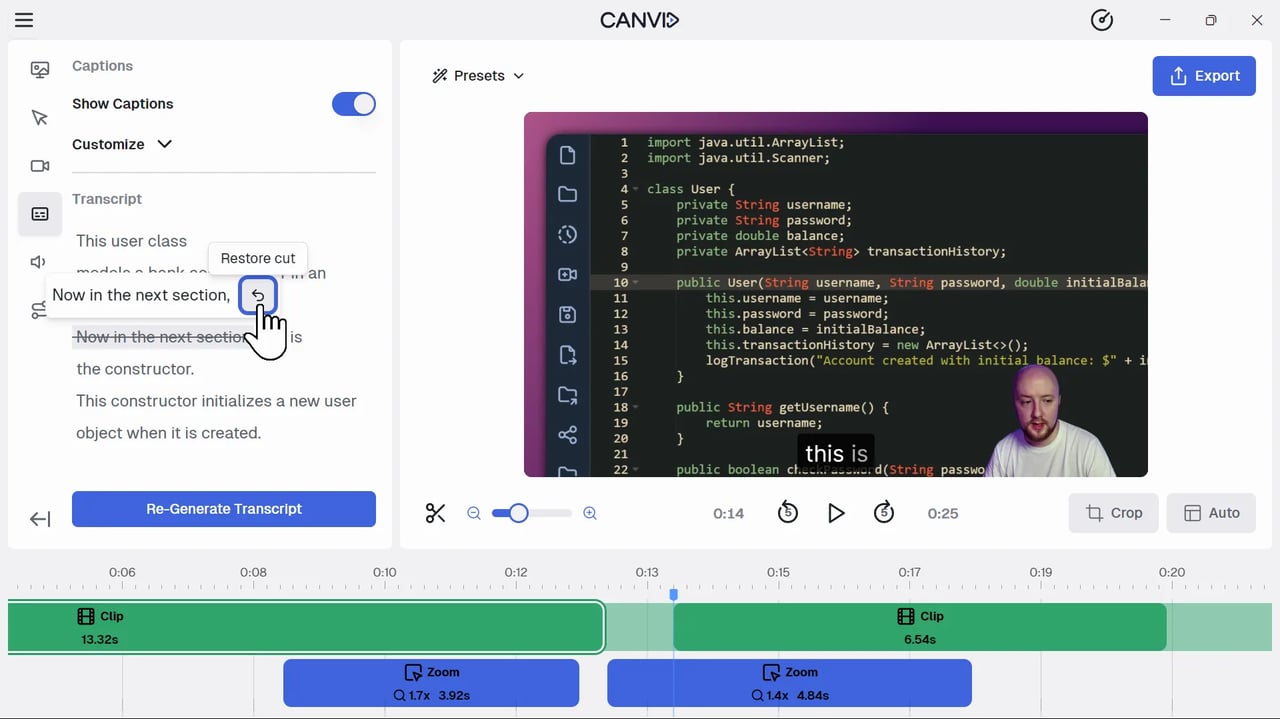
| Transcript-to-Video Editing | ✅ Yes | ❌ | Delete words from the transcript to automatically cut the corresponding video/audio—a massive time saver. |
| AI Audio Retext | ✅ Yes | ❌ No | Highlight a section and re-record or generate new audio using AI cloning to fix mistakes without re-recording the video. |
| Synthetic Webcam | ✅ Yes | ❌ No | Generate a webcam feed from past footage, or sync an AI-generated camera to your recording, even if you forgot to turn the camera on. |
System Audio & Recording Scope
Both capture mic + system audio; Screen Studio’s guides show all-apps or selected-apps recording for tighter control. CANVID offers window/screen capture and cropping; Screen Studio adds polished capture UX and device flexibility on Mac.
📌 Verdict: Rough parity; Screen Studio’s per-app system-audio picker is a nice touch.
Mobile (iPhone/iPad) Recording on Mac
Screen Studio promotes native iPhone screen recording on Mac (USB), which is great for mobile app demos. CANVID relies on macOS/iOS mirroring workarounds when needed.
📌 Verdict: Advantage Screen Studio for mobile capture on Mac.
Recording and Visual Features: Matching the Polish
Both tools offer the core feature set that defines this category: automatic zooms on clicks, dynamic backgrounds, and custom framing. Screen Studio currently holds a temporary edge in a few niche recording options, but CANVID is actively closing the gap.
CANVID vs. Screen Studio: Feature Comparison Summary
| Feature | CANVID | Screen Studio | Comparison |
|---|---|---|---|
| Recording Options | Screen, Window | Screen, Window, Region, iPhone/iPad | Screen Studio has more options today; CANVID's Region recording is releasing soon. |
| Dynamic Camera Layout | Coming Soon | ✅ Yes | Screen Studio allows changing webcam position mid-video; CANVID is integrating this feature. |
| Masking Sensitive Data | Coming Soon | ✅ Yes | Screen Studio allows hiding or darkening sensitive parts of the screen. CANVID is integrating this feature. |
| Audio Background | Coming Soon | ✅ Yes | Screen Studio has a built-in music library. CANVID is integrating this feature. |
| Click Sounds | ❌ No | ✅ Yes | Screen Studio has optional mouse click sound effects. |
Pros and Trade-Offs
Choose CANVID if:
- You use Windows, or work in a Windows/macOS heterogeneous environment.
- You want to save significant time in editing using advanced AI features like Transcript-to-Video cuts, Voice Cloning, and Synthetic Webcam.
- You prefer a Lifetime License and full ownership of your software to avoid recurring subscription fees.
A Few Trade-Offs with CANVID
- Native iPhone/iPad capture isn’t built-in like Screen Studio’s.
What Screen Studio Offers
- Superb auto-zoom aesthetics and cursor motion controls.
- Dynamic Camera Layouts to move the webcam creatively.
- Native iPhone/iPad recording on Mac.
Limitations of Screen Studio
- macOS-only limits rollouts to mixed fleets.
- No equivalents to CANVID’s AI Retakes/Synthetic Webcam.
The Final Verdict: Which Screen Recorder Is Right for You?
Choose CANVID if you want Windows and Mac support, transcript-driven editing, and AI tools that fix mistakes without re-recording—and you like having a Lifetime option. Choose Screen Studio if you’re Mac-only, record lots of iPhone/iPad demos, and value dynamic camera layout tools for on-screen presence.
Frequently Asked Questions
CANVID's cross-platform compatibility (Windows and macOS) ensures that your entire team can use the software, regardless of their machine, which is a key advantage over the macOS-exclusive Screen Studio.
While both create an excellent first draft, CANVID's AI features (Transcript-to-Video Editing and Audio Retext) are designed to make fixes faster than any manual process. By linking the transcript to the timeline, correcting errors becomes a matter of editing text, not scrubbing video.
AI Audio Retakes regenerates lines and auto lip-syncs your webcam, and Synthetic Webcam can create a camera track from prior footage.
Screen Studio supports recording all apps or selected apps. CANVID captures system audio too; choose what fits your workflow.
No. Screen Studio has transitioned to a subscription-only model. CANVID still offers a lifetime license, providing a better long-term value for users who want to own their software outright.
Explore more alternatives