Project Presets
Presets allow you to save your current video styles and editor settings into reusable templates. Whether you're working solo or with a team, presets help you speed up your workflow and maintain a consistent visual style across all your projects.
What's in a Preset?
When you save a new preset, the following editor settings are saved:
- Background settings
- Cursor settings
- Camera settings (excluding Camera AI Background effects)
- Caption visibility (only if captions are generated in the project)
- Zoom Movement animation style
These settings ensure that your projects maintain a consistent look and feel.
Saving a New Preset
Apply editor settings
Apply your preferred background, cursor, camera, transcript, and zoom settings in the editor.
Preset button
Click the Preset button located at the top of the Editor Preview.
Name and save
Enter a name for your preset, then click Create.
Once created, your new preset will be added to the list.
Preset Options
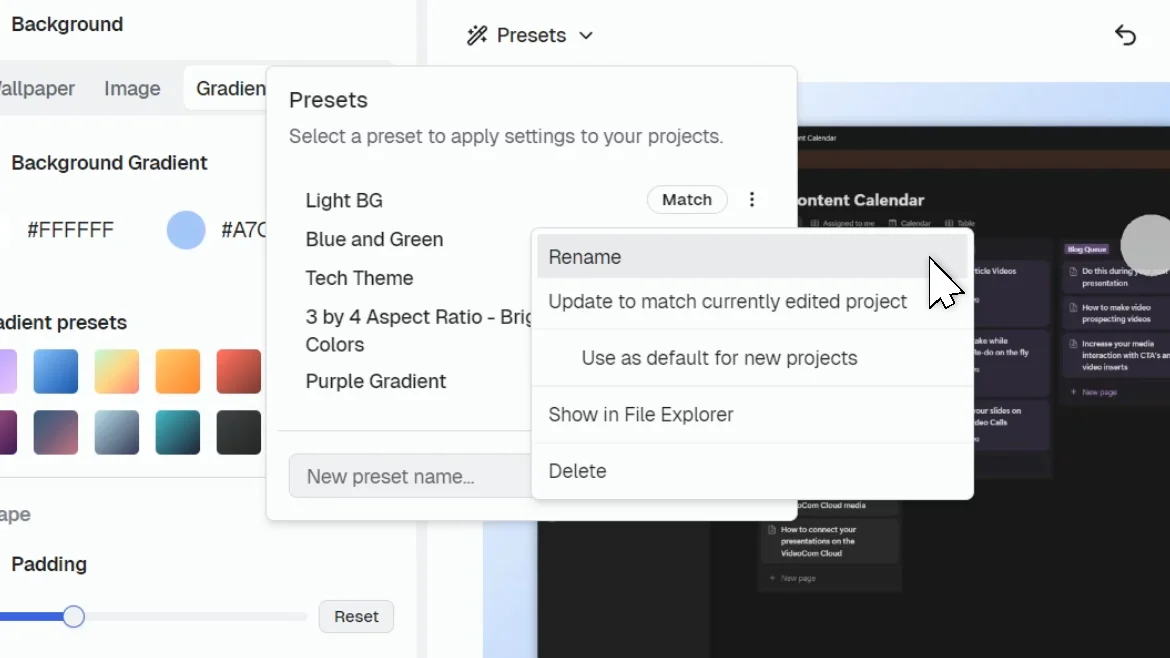
Click the Three dots next to a preset to view additional actions:
- Rename: Change the name of the preset
- Update to match currently edited project: Overwrites the preset with your current editor settings
- Use as default for new projects: Sets this preset as the default for all new projects you create. This preset is marked with a Default icon.
- Show in File Explorer: Opens the local Presets folder, giving you access to .canvidpreset files.
- Delete: Permanently removes the preset from your list
Why Use Presets?
- Faster workflow: No need to reconfigure styles every time.
- Professional consistency: Apply polished, uniform styles across all your content.
- Collaborative convenience: Share presets with teammates or sync styles between multiple devices.
Privacy Areas
Learn how to use Privacy Areas in CANVID to hide sensitive information in your screen recordings. Track, mask, and protect private data before sharing your video.
Editor Sidebar
Learn how to transform regular screen recordings into studio-grade video content by using CANVID Editor's sidebar tools.